
how_to:spectrummatchfeeder
This is an old revision of the document!
How-to populate MSI database with spectrum details
Before exporting a given UserContext to PRIDE XML file, check if the MSI database need to be populated with spectrum details:
- After having created or opened an hEIDI project, open your MSI session but
 Don't forget to activate your hEIDI project.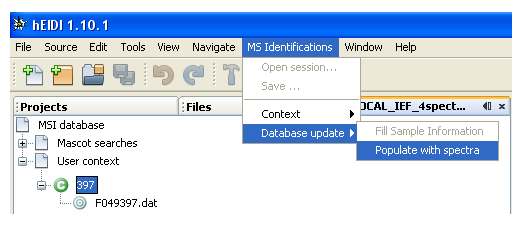
- Check, in Windows Explorer, you have mapped a drive to the Mascot data folder (\\cp-mascot\data) and you are connected to that folder.
- Select a UserContext. It has to be grouped and saved to MSIdb.
- Select the menu
MS Identifications→Database Update→Populate with spectra - A dialog will appear on the screen to indicate if spectrum details are missing for this UserContext
- Check the Mascot data root path. You can use
\\cp-mascot\dataor the corresponding Drive Letter you have set up in Windows Explorer, for exampleY:.


- If spectrum details are missing, click on
Ok, populate MSIdb with missing spectra, else click onDo nothing & Close this window - In case you have clicked
Yes, a message will appear when process is finished

how_to/spectrummatchfeeder.1299752641.txt.gz · Last modified: 2011/03/10 11:24 by 132.168.74.230
Page Tools
Except where otherwise noted, content on this wiki is licensed under the following license: CC Attribution-Share Alike 4.0 International


